

Description
Realistic Mobile Flight Simulation
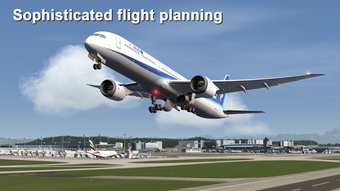
Aerofly FS 2022 is a mobile flight simulator developed by IPACS, offering a highly detailed and immersive flying experience directly from Android and iOS devices. Designed for aviation enthusiasts and simulation gamers, it enables users to pilot a variety of aircraft across realistic environments with interactive cockpits, dynamic weather systems, and accurate flight physics. The game supports over 700 airports across Europe, allowing players to explore diverse regions with photo-realistic scenery and adjustable time of day. Its core purpose is to deliver a lifelike flight simulation experience on mobile platforms, bridging the gap between casual gaming and professional flight training tools. Users can engage in takeoffs, landings, and long-distance flights, with features such as automatic navigation, co-pilot assistance, and a playback system to review flight recordings. The simulation emphasizes realism through customizable wind speed, thermals, and turbulence, enhancing immersion. While the app is free to download, it requires at least 8GB of free storage before purchase, as additional data is downloaded during setup. The game is ideal for hobbyists, aviation learners, and mobile gamers seeking a sophisticated simulation tool that pushes the boundaries of mobile performance.
Key Features & Capabilities
- Interactive 3D Cockpits: Each aircraft features a fully detailed cockpit with clickable instruments and realistic controls, enhancing immersion and operational authenticity.
- 26 Aircraft Options: Players can choose from a diverse fleet, including light aircraft, jets, and gliders, each with unique handling characteristics.
- Over 700 Airports in Europe: Explore a wide range of European airports, from major hubs to small regional fields, with accurate runway layouts and ground details.
- Realistic Flight Physics: The simulation engine incorporates accurate aerodynamics, including adjustable wind, thermals, and turbulence for dynamic flight behavior.
- Adjustable Environment Settings: Customize time of day, cloud density, and weather patterns to simulate various flying conditions.
- Co-Pilot and Automatic Navigation: A switchable co-pilot assists with flight planning, while automatic navigation helps guide aircraft along predefined routes.
- Flight Playback System: Record and replay takeoffs and landings to analyze performance and improve flying techniques.
- Night Flight with Illuminated Cockpit: Experience flying during nighttime with realistic cockpit lighting and ambient airport illumination.
These features enable users to practice real-world flight procedures, experiment with different aircraft handling, and explore vast regions with high visual fidelity. The ability to record and review flights supports learning and skill development, particularly for aspiring pilots. The inclusion of multiple view modes allows for flexible perspectives, though performance may vary when switching between them.
User Interface, Workflow & Performance
The user interface is structured around a central cockpit view with accessible menus for aircraft selection, flight planning, and environmental settings. Navigation is intuitive, with touch-based controls for throttle, rudder, and flight surfaces. The workflow follows a logical sequence: launch the app, select an aircraft and airport, configure settings, and begin flight. However, performance varies depending on device capabilities. The developer did not specify resource usage details, and observations are based on general software behavior patterns. Users may experience lag when switching between camera views, particularly during active flight. Some camera modes fail to activate consistently, disrupting immersion. The interface remains responsive during standard operations, but prolonged use may lead to minor stutters. Stability appears acceptable under normal conditions, though the app is resource-intensive. The simulation engine demands significant processing power and memory, especially during high-detail scenes. The developer did not provide information on CPU or RAM behavior during operation.
Compatibility & System Requirements
Aerofly FS 2022 is available for Android and iOS devices. The software version is 2.5.1, with a download size of 8 GB. This large file size reflects the extensive content, including high-resolution textures, 3D models, and terrain data. The developer did not provide additional system requirements. Exact hardware specifications for optimal performance were not listed. Compatibility information was partially provided, with no mention of minimum processor speed, RAM, or GPU capabilities. Users are advised to ensure their device supports high-end graphics rendering and has sufficient storage space. The app requires at least 8GB of free storage before purchase, which may impact users with lower-capacity devices. The game downloads additional data after installation, which can extend setup time and consume significant bandwidth. Platform compatibility is limited to mobile operating systems, with no support for desktop or tablet devices unless specified by the developer.
Pros and Cons
Pros
- Highly realistic flight physics and environmental dynamics
- Over 700 airports across Europe for extensive exploration
- 26 diverse aircraft with interactive 3D cockpits
- Free to download with no upfront cost
- Flight playback system for performance review and learning
- Adjustable time of day, weather, and cloud settings
- Automatic navigation and co-pilot assistance for easier flight planning
- Supports night flying with illuminated cockpit lighting
Cons
- Lag experienced when switching camera views
- Some camera modes fail to activate reliably
- Resource-intensive; requires 8GB free storage before purchase
- Performance may vary significantly across devices
- Controls require time to master for new users
- Additional data downloads increase setup time and bandwidth usage
- Exact system requirements not disclosed by developer
FAQ Section
Is Aerofly FS 2022 available for free?
Yes, Aerofly FS 2022 is free to download and use. However, it requires at least 8GB of free storage space before purchase, and additional data is downloaded during setup.
What platforms does Aerofly FS 2022 support?
The software is compatible with Android and iOS devices. No desktop or tablet support was specified by the developer.
Is the app safe to download and use?
As a mobile game developed by IPACS, Aerofly FS 2022 is distributed through official app stores. Users should download it from trusted sources to ensure security and integrity.
Does the game require an internet connection?
While the app can be used offline after initial data download, an internet connection is needed for setup, updates, and accessing certain online features.
Can I use Aerofly FS 2022 for flight training?
While the simulation offers realistic flight mechanics and cockpit details, it is designed as a mobile game. It may support basic learning but is not intended as a certified flight training tool.
Final Thoughts
Aerofly FS 2022 delivers a compelling mobile flight simulation experience that stands out in the genre. With its realistic physics, detailed aircraft, and expansive European airport network, it offers a level of immersion rarely seen on mobile platforms. The inclusion of a playback system, co-pilot assistance, and adjustable environmental settings enhances both entertainment and educational value. Despite performance issues such as lag during camera switching and inconsistent view activation, the core simulation remains robust and engaging. The free download model makes it accessible to a wide audience, though the high storage requirement is a notable barrier. For aviation enthusiasts, mobile gamers, and those exploring flight simulation on the go, Aerofly FS 2022 is a top-tier choice. It successfully bridges the gap between casual gaming and professional-grade simulation. Download Aerofly FS 2022 now.
Guides & Tutorials for Aerofly FS 2022
How to install Aerofly FS 2022
- Click the Preview / Download button above.
- Once redirected, accept the terms and click Install.
- Wait for the Aerofly FS 2022 download to finish on your device.
How to use Aerofly FS 2022
This software is primarily used for its core features described above. Open the app after installation to explore its capabilities.
User Reviews for Aerofly FS 2022 0
No reviews found





